
Your needs, this model
Does it fit your priorities?
Can I read a spot check with either hand without losing an illuminated upright display?
Yes. PX1D documents automatic character rotation and a motion-activated backlight. Probe placement still needs to be correct.
Explore this need in the finder →Does the stabilization beep mean I can leave it in a roast and get an alert at my chosen temperature?
No. The beep identifies a settled reading, and the manual prohibits oven leave-in use. It does not establish a target-temperature monitoring alarm.
Explore this need in the finder →Can I adjust its calibration myself after an ice-bath check?
The read PX1D guide explains checking accuracy, not user adjustment. A documented adjustable-calibration model is the appropriate comparison for that requirement.
Explore this need in the finder →The Lavatools Javelin PRO Duo PX1D is for a cook who wants an easier-to-read spot-check thermometer, particularly when using either hand or approaching food from an awkward angle. Its illuminated, automatically rotating display is the useful upgrade. Its stabilization beep helps confirm a settled reading; it is not a documented alarm that follows a roast to a chosen target.
Reading the temperature without rearranging your hand
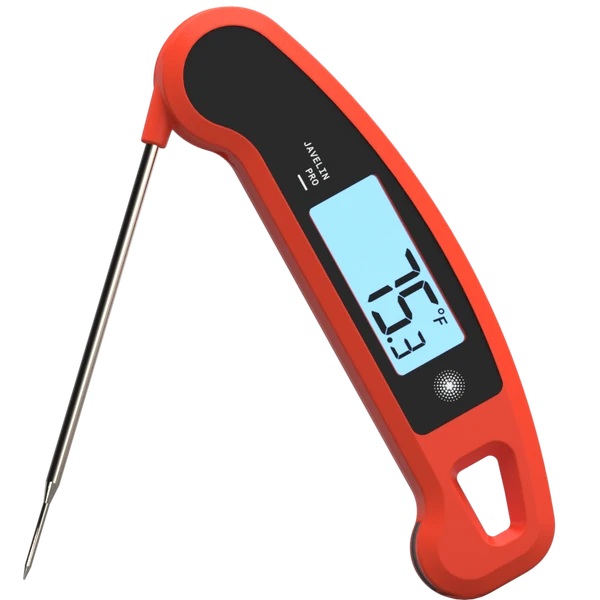
The original PX1D guide describes motion sensing that turns the displayed characters when the instrument is upside down. It also describes activating the backlight through movement. These are practical features when your position is dictated by a pan, a large tray or the side of a grill.
The reason to choose them is to keep the sensing tip where it belongs while you read. If you must withdraw or twist the probe simply to face the display toward you, the number may no longer represent the same point in the food. A rotating readout can reduce that handling problem, although it does not place the probe for you.
Take a deliberate reading inside the food and avoid bone or hard cartilage. When checking several portions, repeat the placement for each one. The instrument is a check-and-remove tool, so checking a new location is part of its useful routine rather than an inconvenience it somehow eliminates.
What its beep means
Holding the touch pad enables the stabilization function. The guide describes a beep after the reading settles, with the value held while the control is held. Releasing returns the thermometer to normal measurement. That can help when you need a moment to look at the display, but remember whether you are seeing a held value or a live one.
A stabilization notification answers “has this reading settled?” It does not establish a user-set cooking-temperature alert. If your main task is waiting for a roast to reach a target while you do something else, choose a thermometer that documents a leave-in probe and the appropriate alert destination.
The original manual specifically prohibits leaving PX1D in the oven. Its folding probe and high measuring range do not make the plastic housing a heat-rated wireless monitor. A separate handheld receiver or a phone app is also not part of this documented package.
Keep the performance claims in scope
The current manufacturer reference gives a typical two-to-three-second response, a range of -40°F to 482°F and an accuracy claim of ±0.9°F within -4°F to 302°F. Those are attributed specifications, not results measured for this review. The narrower accuracy band should not become a claim for every temperature the display can show.
The guide explains an ice-bath accuracy check. That is useful for checking an unexpected indication, but it is not a documented calibration-adjustment procedure. Do not interpret “no calibration needed” as proof that the user can change the offset. If adjustment is an essential part of your work, the separately documented PT18 provides a different control arrangement.
The maker’s page is currently headed Javelin PRO Classic while retaining PRO Duo descriptions and a link titled PX1D manual. This assessment follows the explicitly identified PX1D operating configuration, not the older PX1 or another product inferred from the word “Pro.”
Settings, batteries and care
Fahrenheit/Celsius selection and other preferences are handled by switches inside the battery bay, with a restart required for changes. Set them up deliberately rather than trying to discover them over a hot pan. Motion wake and a sleep routine can make ordinary handling more convenient, but they are not permission to leave the instrument monitoring inside an oven.
A CR2032 cell powers the tool. Follow the correct battery procedure when the low-power indication appears, then check that your preferred settings operate as expected. The manufacturer’s battery-life estimate is not an independently measured endurance result.
PX1D’s instructions prohibit the dishwasher and immersion. Its splash resistance and antimicrobial-shell claim do not replace proper cleaning of the food-contact probe. Keep cleaning methods within the actual guide, dry the instrument appropriately and store the folded probe safely.
Choose it for visibility, rather than remote monitoring
PX1D makes sense when an illuminated rotating readout, hold function and stabilization cue solve real spot-check problems. A simpler Javelin PT12 remains a useful alternative when you do not need those display features. For following food continuously or receiving a target alarm away from the cooking area, compare actual leave-in systems instead. Those are different jobs, even when both products are called meat thermometers.
Key details at a glance
| Documented spot-check use | Yes |
|---|---|
| Documented leave-in monitoring | No |
| Included food probes | 1 |
| Fahrenheit display | Yes |
| Celsius display | Yes |
| Illuminated instrument readout | Yes |
| Rotating displayed characters | Yes |
| Dishwasher-safe food probe | No |
| Measuring without batteries or charging | No |
| Documented food range minimum | -40°F |
| Documented food range maximum | 482°F |
| Probe length | 114.3 mm |
| Probe-tip diameter | 1.6 mm |
| Manufacturer accuracy claim | Manufacturer: ±0.9°F only from -4°F to 302°F, not a full-range claim. |
| Power arrangement | One CR2032 cell; preference switches inside the battery bay require a restart. |
| Care notes | No dishwasher, immersion or leaving the device in the oven; follow probe and damp-cloth body care. |
Use the exact model’s instructions for operating limits, supplied equipment and version differences.
Sources for this assessment
Find a thermometer for your cooking routine.
Compare the documented measuring setups, included equipment and features that matter to you.