
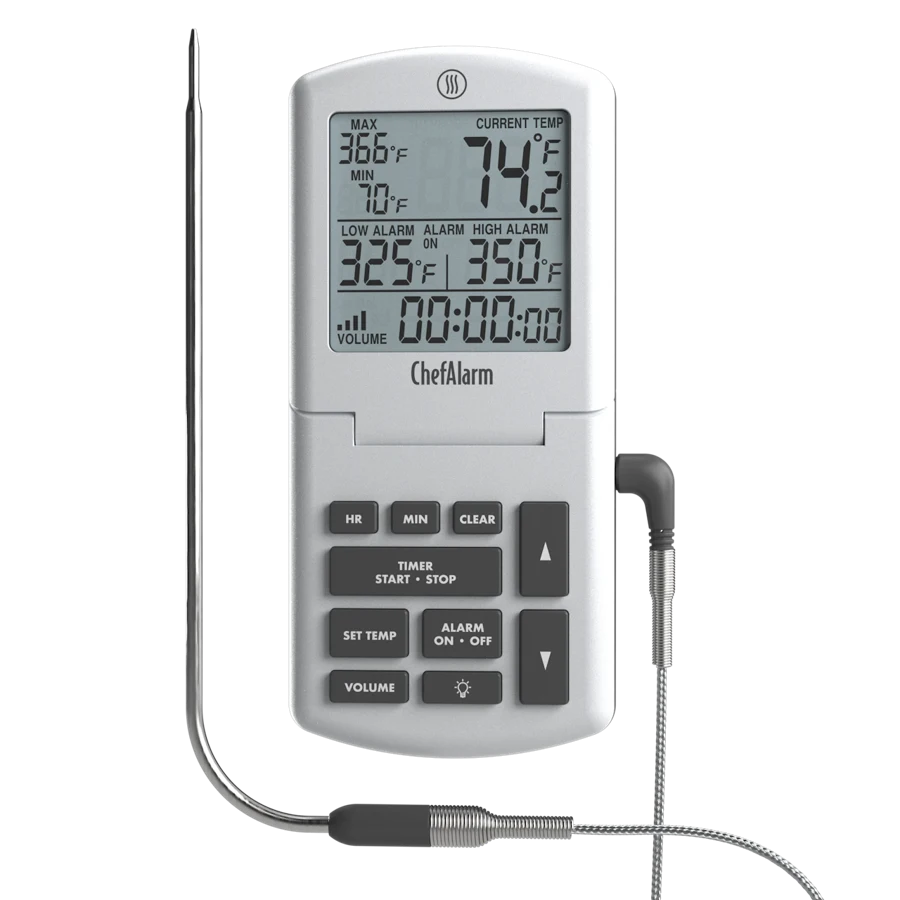
Your needs, this model
Does it fit your priorities?
Can it warn me about a roast without involving my phone?
Yes. Its own display sets and sounds the temperature alarms; keep it close enough to hear.
Explore this need in the finder →Will the standard package watch two separate pieces of meat?
No. The standard cooking configuration here supplies one food probe, so choose a genuinely multi-food kit for two independent temperatures.
Explore this need in the finder →Can I adjust it after a careful ice-bath check?
Yes, using the maker’s trim procedure. The limited offset corrects a small check-point error; it is not a repair for a damaged probe.
Explore this need in the finder →A good fit when the alarm should stay in the kitchen
ChefAlarm makes sense when you want to set a temperature, watch a roast develop and hear an alert from a nearby counter. There is no phone pairing step between you and the main controls. The tradeoff is equally practical: this is a one-food, cabled setup. A person cooking three steaks to different finishing points needs more measurement channels, while someone walking beyond hearing distance needs a different way to receive an alert.
The useful part is the combination of a live reading, adjustable high and low limits, and a timer. Think of a pan you want to keep within a chosen working range rather than simply a roast you want to finish. A temperature alarm answers a different question from a countdown: one follows the food or liquid, the other follows elapsed time. Neither can tell whether you put the probe in the right place.
Build the setup around the supplied probe
The standard configuration uses one Pro-Series cooking probe connected to the display. Put the sensing end into the food, arrange the lead so the door does not crush it, and leave the electronic unit outside the cooking enclosure. Check the reading before settling into the rest of the meal preparation. A plausible number is only a starting check; reposition a tip that is touching bone, a pan or an unintended air pocket.
The included clip is useful for supported pot arrangements. It does not create another sensing channel. If you put the one probe in a liquid, it is no longer measuring the centre of your meat. If your real requirement is a food temperature and a separate grate temperature at the same time, start with a kit that actually supplies both sensors. Optional accessories should be considered as a separate configuration.
Several heat limits apply to different parts
The maker’s specifications distinguish the measurement range, the electronic body’s operating conditions, the cable and the transition near the handle. That distinction matters more than the biggest number in an advertisement. The cable’s headline rating is not permission to expose every part of the instrument to the same heat. Route it away from flames and hot spots, and follow the original quick-start guide rather than treating the unit as a wireless probe.
A backlit readout helps you check the display without turning the cooking task into a phone task. It does not make the screen a remote receiver. Before relying on an alert during a busy meal, test whether you can hear it from the room where you expect to be. Household noise and your own hearing needs are more useful criteria than assuming the maximum advertised volume solves every situation.
Calibration is useful, but not a substitute for care
ChefAlarm has an actual user trim procedure. The calibration guide limits the correction and explains that an offset applies beyond the check point. Make a proper ice bath, let the reading stabilise and investigate an unexpectedly large error. A small adjustment is not evidence that a wet connector, damaged cable or overheated sensor has been restored.
After cooking, let hot parts cool before handling them, clean the food-contact portion and protect the connector from moisture. Store the cable without sharp bends. These habits are especially relevant to a tool that spends much of its life being routed around doors, lids and cookware.
Who should choose something else?
Choose a separate handheld instant-read tool if your main job is checking several small pieces in turn. Choose a multi-probe monitor if simultaneous channels are essential, or a documented receiver/app configuration if the alert must travel with you. ChefAlarm’s strength is a clear local workflow for one monitored food or liquid. It earns that role through useful controls, not by pretending the standard package covers every cooking task.
Key details at a glance
| Documented spot-check use | No |
|---|---|
| Documented leave-in monitoring | Yes |
| Included food probes | 1 |
| Fahrenheit display | Yes |
| Celsius display | Yes |
| Illuminated instrument readout | Yes |
| User calibration adjustment | Yes |
| Measuring without batteries or charging | No |
| Documented food range minimum | -58°F |
| Documented food range maximum | 572°F |
| Probe length | 152.4 mm |
| Probe-tip diameter | 2 mm |
| Manufacturer accuracy claim | Maker specification ±1.8°F at -4–248°F, ±3.6°F at -58–-4°F and 248–392°F, ±5.4°F at 392–572°F; not our test. |
| Power arrangement | Two AAA batteries; display remains outside the oven. |
| Care notes | Do not immerse probe/connector; keep the connector dry and follow the original guide. |
Use the exact model’s instructions for operating limits, supplied equipment and version differences.
Sources for this assessment
Find a thermometer for your cooking routine.
Compare the documented measuring setups, included equipment and features that matter to you.