
Your needs, this model
Does it fit your priorities?
Can I monitor one roast without a phone and hear an alert?
Yes. The supplied cabled probe feeds the local display and its programmable target-temperature alert. Keep the display outside the hot oven.
Explore this need in the finder →Can it monitor two foods and the grill chamber together?
No. The documented package has one probe. It cannot provide simultaneous readings from three separate locations.
Explore this need in the finder →Is it a sensible choice for a high-heat rotisserie?
No for a wire-free rotisserie requirement: its food probe is cabled. The maker also publishes conflicting cable heat limits, so a high surrounding-heat match is not established.
Explore this need in the finder →A roast monitor that stays beside the oven
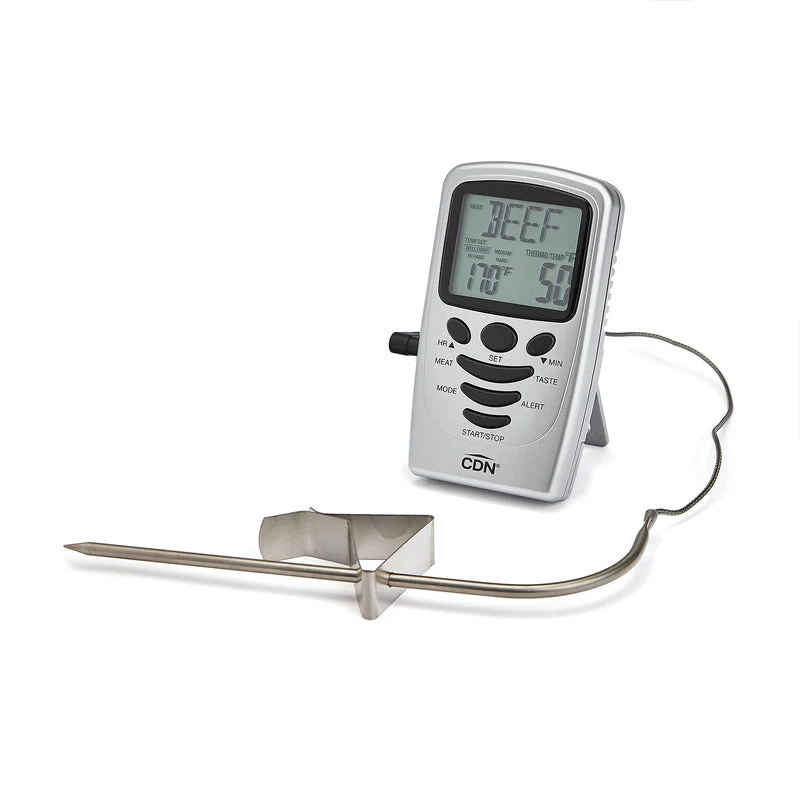
The CDN DTP482 is for the cook who wants one food reading and a local alarm while the oven stays closed. A metal probe remains in the food, a cable runs outside and the display sits nearby. You can set a temperature yourself instead of relying entirely on a meat menu. There is no need to keep a phone connected to see the number or hear the unit's alert.
That simple layout is also its limit. One supplied probe means one measured location at a time. It does not provide separate live readings for two roasts, and it cannot watch a roast and the cooking chamber simultaneously with that same probe. If your meals regularly involve different foods finishing separately, consider a genuine multi-probe package rather than buying this expecting the timer to add another measurement.
Set a temperature, then position the display sensibly
The useful screen distinction is actual temperature versus the target you selected. Watching both helps you understand whether the cook is still far from its target without repeatedly opening the oven. When the selected temperature is reached, the local display flashes and the alert sounds. The temperature alarm is a separate function from the count-up and countdown timer; elapsed time alone is not a measured food temperature.
The probe belongs in the food and the case belongs outside the hot space. CDN supplies a stand, magnet and hanging option, which gives you several ways to arrange the display. A magnetic back should not tempt you to attach the plastic case to a hot barbecue. Plan the location before loading the oven: the cable must reach without being stretched, cut or resting against a direct heat source.
The cable specification needs careful reading
The DTP482 is an example of why a large temperature number is not enough to choose a thermometer. CDN's current product reference states a 400°F cable rating for three hours, while its linked older instruction sheet gives different cable-temperature statements. Those materials do not establish a single reliable high-heat operating promise for every part of an existing or newly supplied assembly.
If high surrounding heat is central to your cooking, resolve the rating of the actual supplied probe and cable before choosing it. Do not treat the 482°F food-reading maximum as permission to place every component in an equally hot environment. Nor does a cable's rating make the display heat resistant. For ordinary oven use, follow the instructions that accompany the exact assembly and protect the cable from burners and flame.
A single probe can also serve a pan
The supplied adjustable clip gives the probe a second useful setting: attached to a saucepan rather than inserted into a roast. The tip needs to sit in the mixture without touching the pan bottom, and the cable still needs a safe route away from the cooktop heat. This is a change of placement, not another simultaneous channel. You must choose what the one probe is measuring.
The programmable temperature range is 32°F to 482°F. The older sheet contains a lower thermometer-range statement elsewhere, so this review uses the documented programmable range when discussing target selection. For the cook, the practical question is whether the target you need can actually be set and monitored in the intended arrangement, rather than whether a different paragraph prints a wider number.
Choose it for monitoring, keep a pen for spot checks
A cabled probe is useful for following the rise at one position. A separate spot-check thermometer, such as the CDN DT392, is a different complement: you can check another part of the food or another portion without dismantling the monitoring setup. Neither reading should be mistaken for a complete picture of every point in a large meal.
After use, clean and dry the probe while keeping water out of the plug and the probe-to-cable connection. The display is not waterproof. The DTP482 uses one AAA battery, so it is simple to power but is not battery-free. Choose it when a single local reading and an adjustable alert solve your main problem. Choose a receiver or supported phone-connected system if you need to carry the reading elsewhere, and use current food-specific safety guidance when selecting your target.
Key details at a glance
| Documented leave-in monitoring | Yes |
|---|---|
| Included food probes | 1 |
| Fahrenheit display | Yes |
| Celsius display | Yes |
| Measuring without batteries or charging | No |
| Documented food range minimum | 32°F |
| Documented food range maximum | 482°F |
| Probe length | 140 mm |
| Power arrangement | One AAA alkaline battery. |
| Care notes | Clean and dry the probe; keep the case,plug and probe/cable connection out of water. |
Use the exact model’s instructions for operating limits, supplied equipment and version differences.
Sources for this assessment
Find a thermometer for your cooking routine.
Compare the documented measuring setups, included equipment and features that matter to you.